One of the many challenges of remote learning so far has been assessing the extent to which students are participating in online learning. In the classroom, a quick glance around the room allows us to quickly judge what is going on but when we’re all hidden away, interaction with students can feel…well, remote.
To tackle this I have been exploring a few different techniques in a bid to increase engagement during the lesson and, more importantly, see it. As I am teaching a fully live timetable, this is particularly important in very much the same way it would be in a classroom setting.
I’ve seen lots of posts on Twitter championing class interaction through Jamboard and live editing in Google Slides. Although these look really great, and are working well for those people, there were a couple of issues for me. Firstly, we are using Microsoft Teams which means not all software has an equivalent on this platform (or I haven’t discovered it!) and secondly, a lot of what I have seen looks a little fiddly and would add to the time required to prepare for each lesson. I’m not a Luddite but I also don’t want to find myself spending much of my time outside of lessons creating new resources for all of my classes or setting up templates etc.
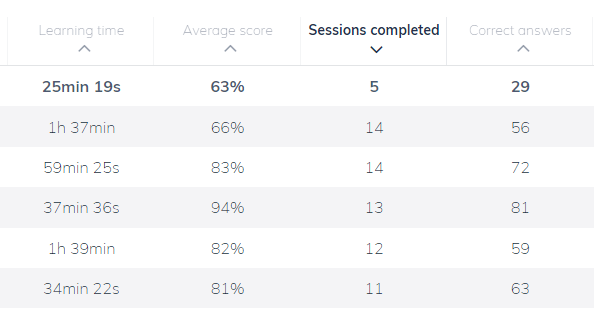
I’m a huge fan of Seneca learning and most of my classes are directed to use this site, especially at GCSE. We have used Seneca for a few years now and find it works well. I particularly like being able to peek behind the scenes and see how students are getting on with their revision. Taking a look at the ‘students’ page (below) is very useful for assessing student activity. I can see how much time students are spending on Seneca as well as how successfully they have completed each section. However, Seneca is a great tool but it doesn’t solve my live lesson problem.
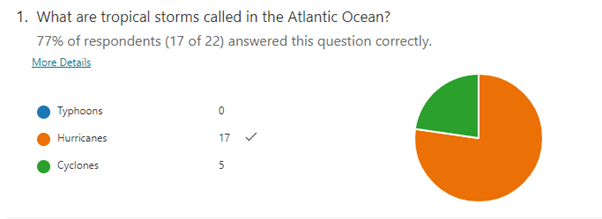
We recently introduced weekly quizzes through Microsoft Forms. I can create simple, self-marking quizzes containing a mix of question styles and they are great for assessing knowledge. The response summary page provides an overview of how classes answered individual questions (below) so I can decide whether or not something needs a brief recap or further explanation. I can also take a more detailed look at an individual student’s answers and see how they fared. The quizzes are really good and we will continue to use them but they require quite a bit of work in advance and don’t allow me to instantly interact with students.
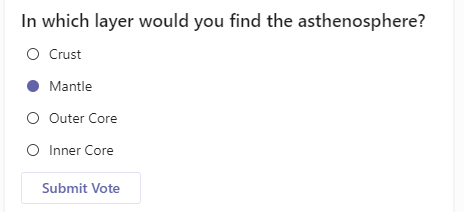
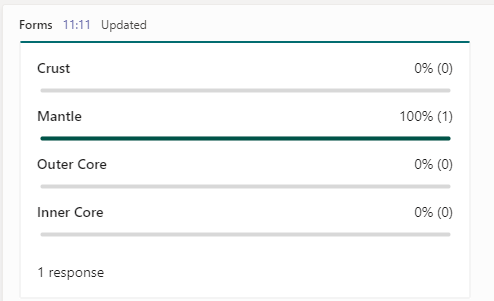
A colleague discovered a short-cut to quickly add a quiz question or poll during a live lesson. By simply typing “@form” in a new post, a question can be created and instantly shared with students. This is useful when wanting the responses to one or two questions during a lesson as it enables me to see how many students are participating and whether they have understood what has been taught. Again though, this isn’t perfect as the question has to be created on the main class page in Teams and doesn’t work in the live chat feed so it means switching between screens. This is a useful tool and does a job but I won’t be relying on it for lots of active participation during the lesson, instead I will use it for brief and occasional feedback from students.
The more I deliver live lessons, the more comfortable I feel navigating and sharing various screens. I now ensure the live chat is visible to me at all times (I know some colleagues have this on a second screen or device) and promote engagement be requesting questions from students in the same way I would invite questions in the classroom. My students are clearly becoming more comfortable as well and I am experiencing more purposeful ‘chat’ participation week-on-week. I particularly enjoy seeing students responding to each other and building on or challenging answers. My lessons now regularly involve questions which I will deliver verbally followed by an instruction for all students to type their answer into the chat but not press send. I then give a countdown 3, 2, 1… and all students submit their answer at the same time. It’s a little hectic with larger classes but I can often spot mistakes and provide feedback. It’s not easy to see if everyone has taken part but it is an indicator of student involvement and promotes friendly competition. As well as asking everyone for an answer, the live chat is also really useful for cold-calling, if you can bear a few moments of silence when a student delays in sending their response!
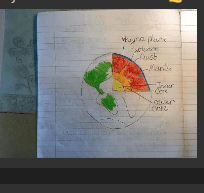
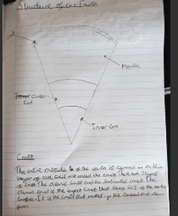
I have also found the live chat is a useful space to ask students to update me on their progress when completing extended tasks. If I give students over 15 minutes to do something, it can be rather unnerving to let them get on without being able to watch them work. To alleviate my angst, I request that students share a screen shot or photo of their work part way through the task (below). This is beneficial for the students as well as they can see how they are getting on compared to their peers in much the same way as they would by glancing around the room at school.
Finally, we could have a game-changer! Scrolling through Twitter I stumbled across a post by Mark Roberts (@mwrgeography). Mark shared the website whiteboard.fi which allows a teacher to create a temporary, virtual classroom and share a link with students. Students open the link and have access to a virtual whiteboard which they can type, write or draw on. I used this for the first time today and was incredibly excited when I saw everyone in the class working in real time. Not only had it taken me no time at all to create and share the link but on the whole, students could access the site and complete the work on any device. I must add, it wasn’t perfect and some students experienced ‘glitching’ or parts of their answer disappeared but overall, the feedback was positive and it was the first time I have been able to set a task and watch everyone complete it. I could share my screen and show them what I could see as well as opening individual pieces of work to model good practice (below).
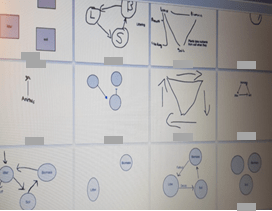
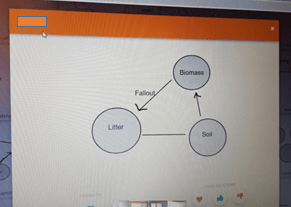
There are plenty of excellent tools out there but if, like me, you want something quick and easy to use in lessons then I would recommend whiteboard.fi. Clearly, I haven’t used it much yet but so far it seems to be just what I was looking for and will allow me to monitor and promote engagement in my live lessons.
 teaching geography